Sales tell you what you sold. PeekProfit tells you what you kept.

PeekProfit adds up every cost behind every Shopify order (product costs, shipping, payment fees, ad spend and your own expenses) and shows your real net profit, updated within seconds of each sale.

Coming soon to the Shopify App Store. 14-day free trial on every plan.

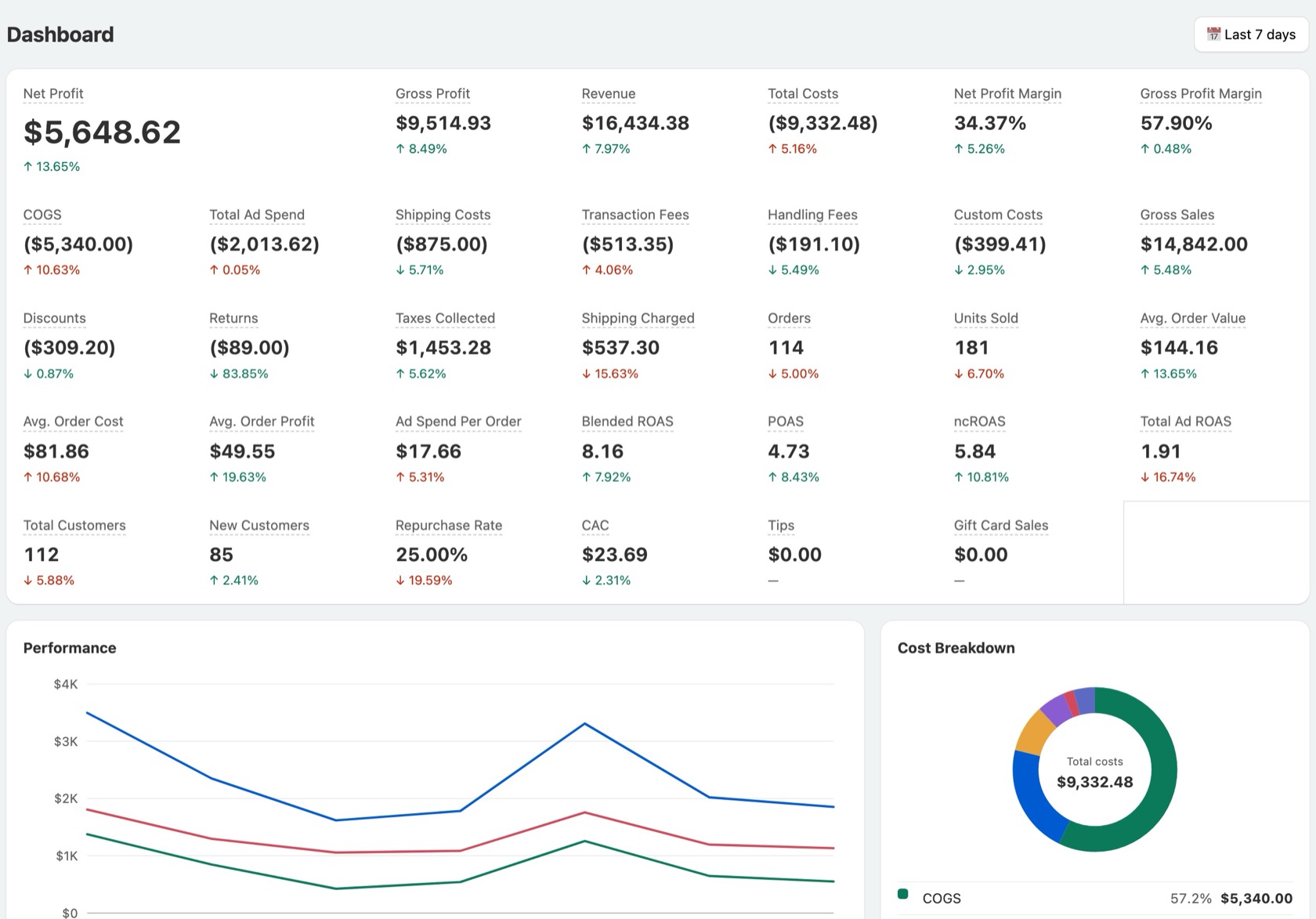
PeekProfit dashboard showing net profit, gross profit, revenue, costs and margins for the last 7 days, with a performance chart and cost breakdown
The whole picture

Net profit, worked out the way your bank account sees it

Shopify shows revenue. The money you keep is what is left after everything else. PeekProfit takes it all off, order by order.

Revenue− Product costs− Shipping− Payment fees− Handling− Ad spend− Your own costs= Net profit
Features

Everything that eats into your margin, in one place

Set your costs once. PeekProfit applies them to every past and future order, and recalculates history when you change them.

Live profit dashboard

More than 30 numbers, from net profit and margins to ROAS, CAC and repurchase rate, each compared with the previous period.

Product costs that match reality

Costs come in from Shopify automatically. Add cost history by date, bulk-buy tiers and different costs per country.

Shipping, fees and handling

Shipping cost per order, per item, by quantity or by weight, set per country. A fee rule for each payment gateway, and a handling fee per order and per item.

P&L report

A full profit and loss statement by day, week or month, ready to export to CSV for your accountant.

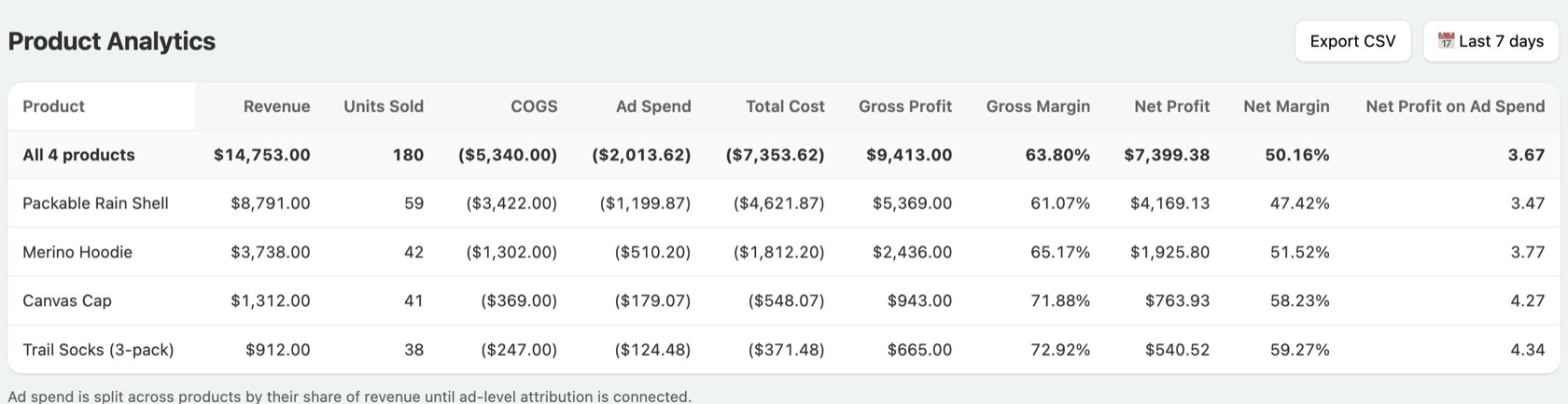
Profit by product

See which products actually make money once their share of costs and ad spend is taken off, not just which ones sell.

Customer lifetime value

Monthly cohorts show how much each group of new customers spends over time, against what it cost to win them.

P&L report

Your profit and loss, without the spreadsheet

Every line from gross sales to net profit margin, day by day. Sales, discounts and returns follow Shopify's own definitions.

  • Refunds and returns counted on the day you choose
  • Tax-inclusive prices, gift cards, tips and duties handled correctly
  • Cancelled and test orders left out unless you want them
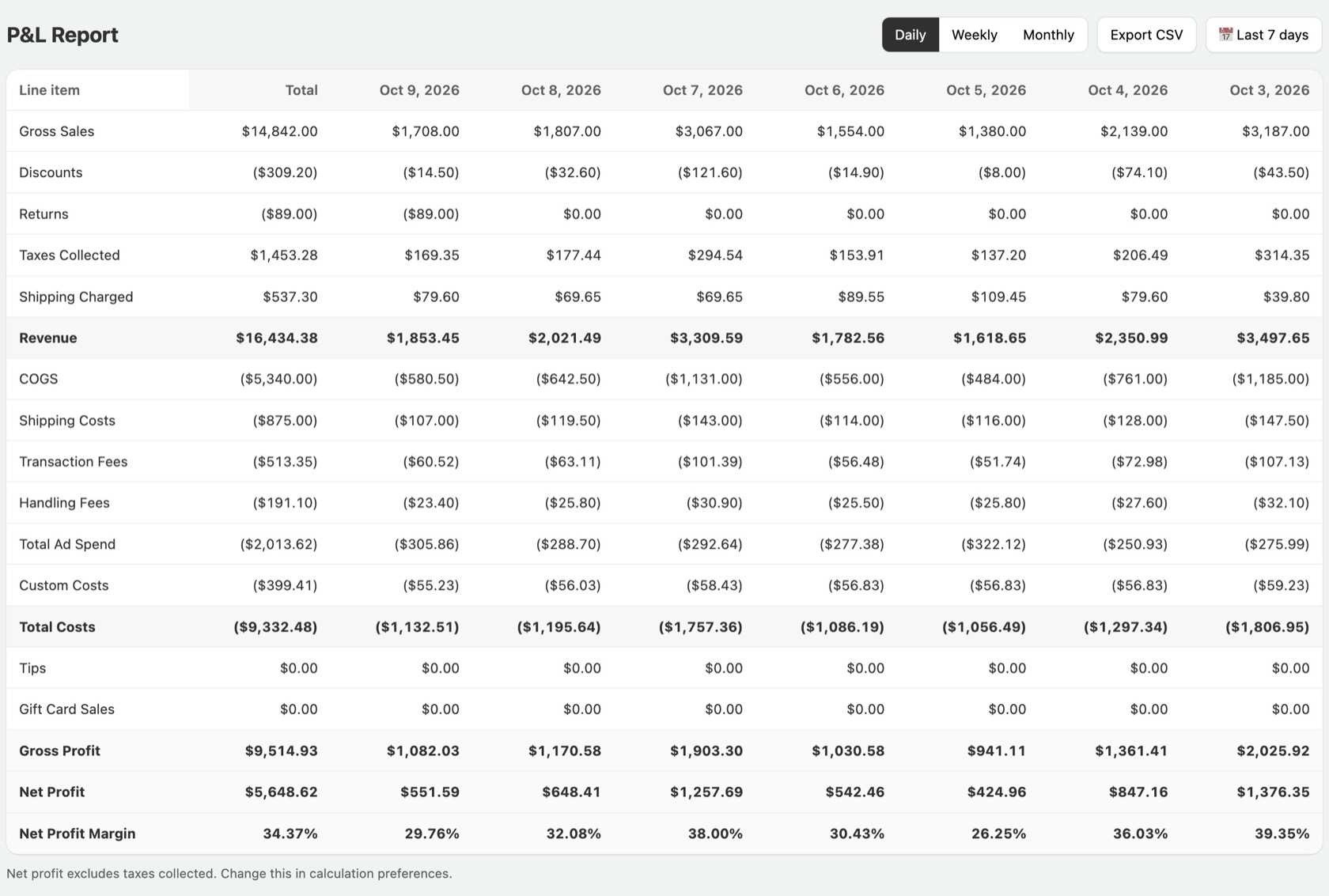
P&L report table with daily columns from gross sales down to net profit margin
Product analytics

Know which products pay for the rest

Revenue, units, product cost, ad spend, gross and net margin for every product, side by side.

  • Sort by net margin to find the products worth pushing
  • Spot best sellers that quietly lose money
  • Export to CSV in one click
Product analytics table with revenue, units sold, costs, gross and net margin per product
Built for trust

Read-only, private, and always up to date

Read-only access

PeekProfit can read your orders and products. It cannot change anything in your store.

No customer personal data

We never store your customers' names, emails, phone numbers or addresses. Only the shipping country is kept.

Updates in seconds

New orders, refunds and edits flow in as they happen, and a nightly check catches anything that was missed.

Pricing

Pay for the orders you get

Every plan starts with a 14-day free trial. Billed in US dollars through your Shopify invoice.

Basic

$35/month

300 orders a month

then $0.30 per order, at most $300

  • Live profit dashboard
  • All cost settings
  • Every order with its costs and gross profit
  • Customer lifetime value
  • CSV export

Advanced Popular

$60/month

600 orders a month

then $0.20 per order, at most $500

  • Everything in Basic
  • P&L report
  • Product analytics

Ultimate

$100/month

1,500 orders a month

then $0.10 per order, at most $700

  • Everything in Advanced

Enterprise

$200/month

3,500 orders a month

then $0.07 per order, at most $1,000

  • Everything in Advanced

Orders are counted per 30-day billing period. Extra orders are charged at the end of the period, and never more than the cap shown.

FAQ

Questions

How does PeekProfit calculate net profit?

Revenue is gross sales minus discounts and returns, plus shipping charged and taxes collected. From that we take product costs, shipping costs, payment fees, handling fees, ad spend and your custom costs. By default taxes collected are taken off too, since they are not yours to keep; you can change that in the settings.

Where do my product costs come from?

PeekProfit imports the cost you entered in Shopify for each product. You can override it, keep a history of costs by date, set lower costs for larger quantities, or set different costs per country.

How far back does it go?

When you install, PeekProfit imports your recent orders so your reports start full. Changing a cost later recalculates past orders, so your history stays right.

Can I add my ad spend?

Yes. Enter ad spend by day and platform, and it flows into net profit, ROAS, CAC and the product report.

What data do you keep, and where?

Order totals, line items, costs and the shipping country, on our servers in Sydney, Australia. No customer names, emails, phone numbers or street addresses. Uninstall and we delete your store's data. See the privacy policy.

Can I cancel any time?

Yes. Uninstalling the app cancels your plan through Shopify. If you uninstall during the free trial, you pay nothing.

Find out what you really kept this month

PeekProfit is coming to the Shopify App Store. Want to try it first? Write to us.